AutoSync

For independent auto repair shops

Shop management that keeps up with the bay, not just the front desk.

Booking, check-in, the job board, inspections, parts, purchasing, invoicing and the books — one system, every feature in every plan, built to work on a technician's phone as well as it works at the counter.

14 days free. No card required. · Plans from $59.99 CAD/mo

  • Appointments
  • Check-in
  • Job board
  • Inspections
  • Condition maps
  • Parts & stock
  • Purchase orders
  • Invoicing & payments
  • Canadian tax
  • QuickBooks sync
  • Reports
  • Permissions
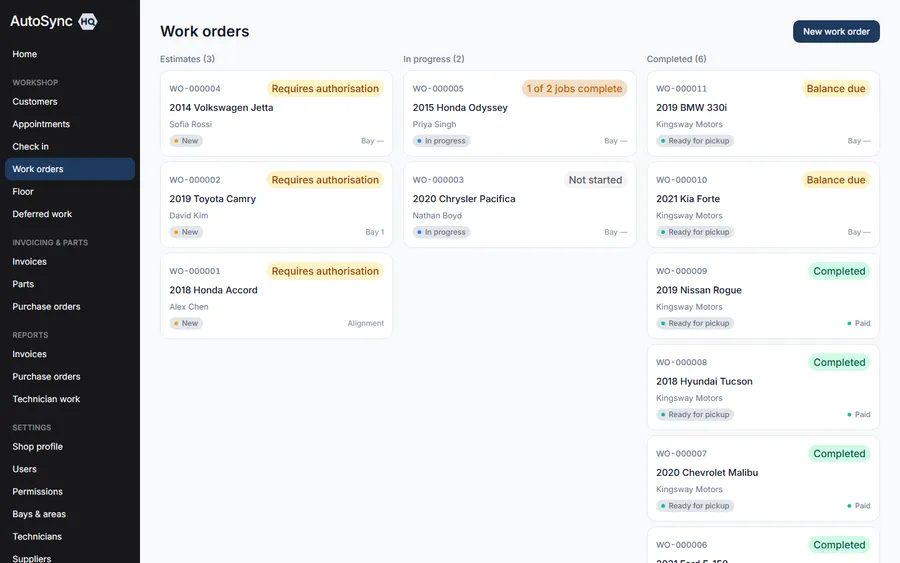
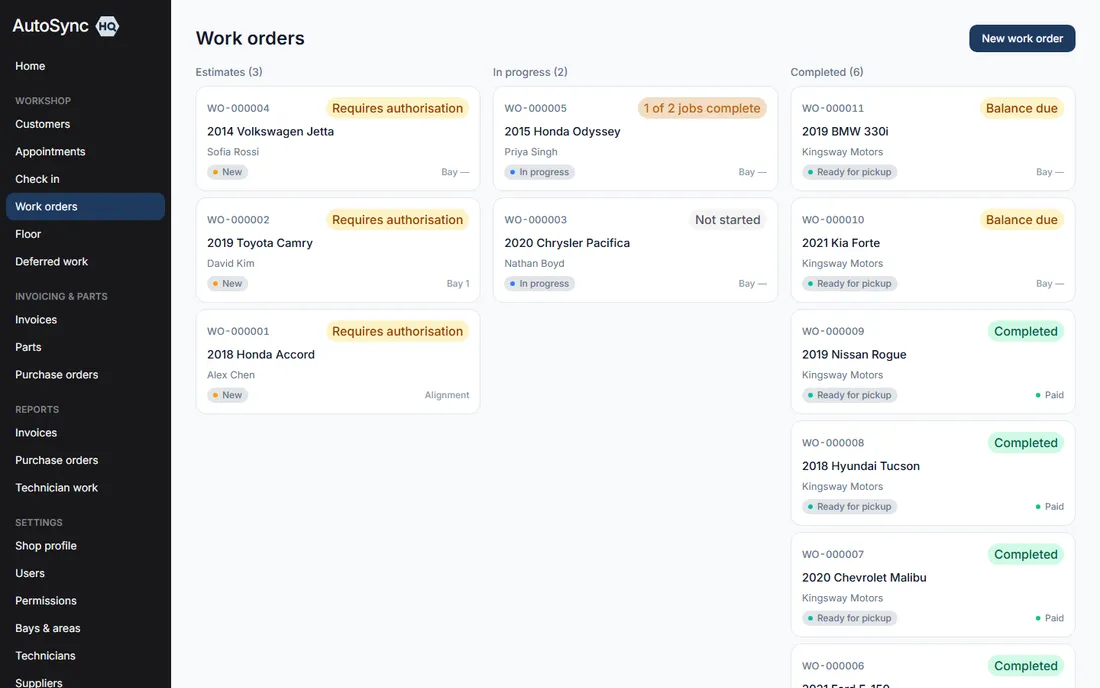
The AutoSyncHQ work order board — estimate, in progress and completed columns
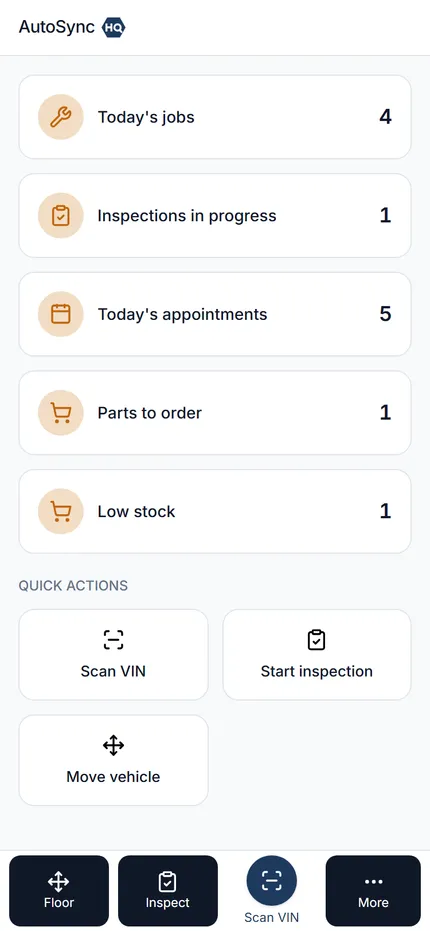
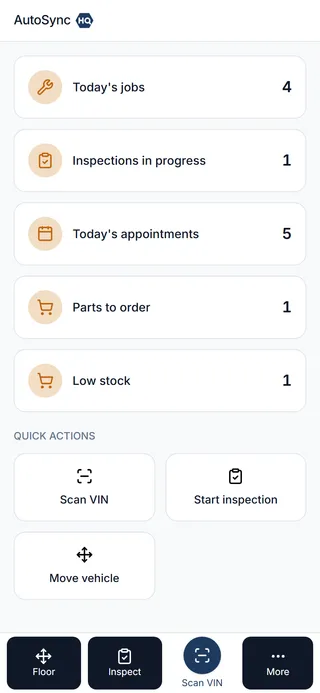
The same product on a technician's phone

14 days

Free trial, no card taken

1 tier

Every feature, at every price

80+

Permissions you control per person

GST · HST · PST · QST

Canadian tax, plus US state rates

The daily friction

You didn’t get into this business to fight a whiteboard.

A job’s status lives in someone’s head until you catch them at the counter.

Status is derived from the facts — jobs authorised, work done, invoice paid — and can never be stale, because nobody types it.

A customer declines a repair in April and nobody remembers it in October.

Declined and advisory work stays on file against the vehicle and comes back on the deferred work report.

A part comes off the shelf and the count is wrong until the next stock take.

Parts reserve when they’re quoted and leave stock when the work starts — every movement is a ledger row.

A car gets moved for a road test and the next person starts walking the lot.

Every vehicle has a location — bay, lot, road test, off-site — and the floor view is the same for everyone.

How it works

One car, from the phone call to the payment.

Six steps, one record. Nothing is re-keyed between them, and nothing is left behind when the car leaves.

  1. 1

    Booked

    The calendar takes the booking with the services on it, so the day is planned against real capacity, not a guess.

  2. 2

    Checked in

    Odometer, complaint and a condition map at arrival. The appointment becomes a work order without re-typing anything.

  3. 3

    Inspected

    A technician runs the inspection on a phone in the bay — pass, advise or fail, with the measurement and a note.

  4. 4

    Authorised

    Findings convert to priced job lines. The customer approves some and declines others, and the advisor records each answer against its own line.

  5. 5

    Worked

    Parts leave stock as work starts, jobs are marked complete one at a time, and the vehicle’s location moves with it.

  6. 6

    Invoiced

    Only authorised work is billed, with the right tax, payment taken at the counter — and QuickBooks updated without a CSV.

And what was declined doesn’t disappear. Every declined or advisory line stays on the vehicle’s record, with the technician’s note and the date, ready for the next visit — that’s the deferred work report, and it’s the difference between a customer who comes back and one who doesn’t.

The product

Everything the shop actually runs on

Every screen below is a real one, from a real shop’s data — not a mockup of a product that doesn’t exist yet.

A job board that updates itself — a real screen from AutoSyncHQ

Work orders

A job board that updates itself

Three stages — estimate, in progress, completed — and a status derived from the facts underneath: awaiting authorisation, two of five jobs complete, balance due. Nobody re-types a status onto a whiteboard, and it can never be out of date.

Built for the bay — a real screen from AutoSyncHQ

Mobile

Built for the bay

The same application on a technician's phone as at the counter — not a stripped-down mobile mode with half the features missing.

Approve and decline, job by job — a real screen from AutoSyncHQ

Authorisation

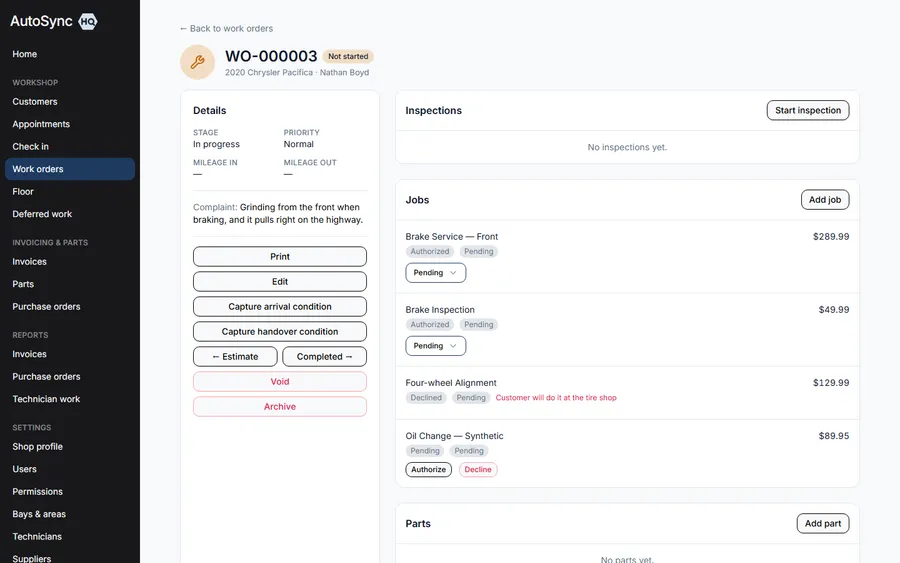
Approve and decline, job by job

A customer takes the brakes and leaves the exhaust. Each line carries who approved it and when — and the declined line stays on file rather than vanishing.

Inspections that become quotes — a real screen from AutoSyncHQ

Inspections

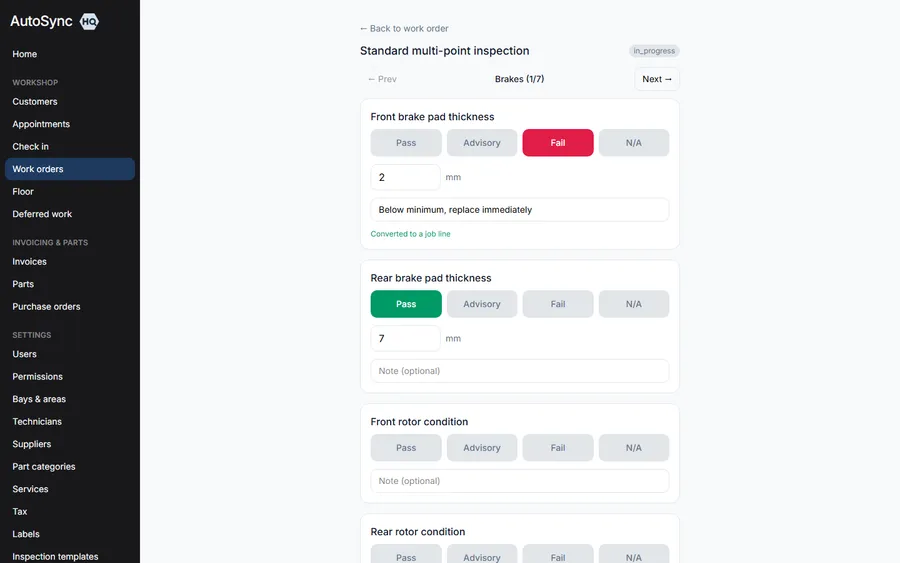
Inspections that become quotes

A failed point converts to a priced job line in one tap, carrying the technician’s measurement and note across with it.

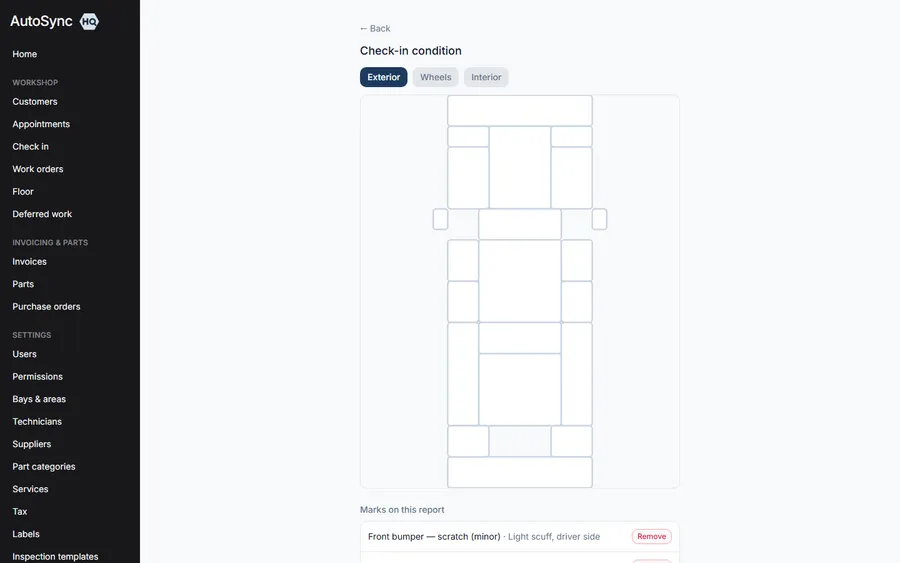
Condition, mapped at the door — a real screen from AutoSyncHQ

Arrival

Condition, mapped at the door

Mark existing damage zone by zone when a car arrives. The same map is there to compare against at handover.

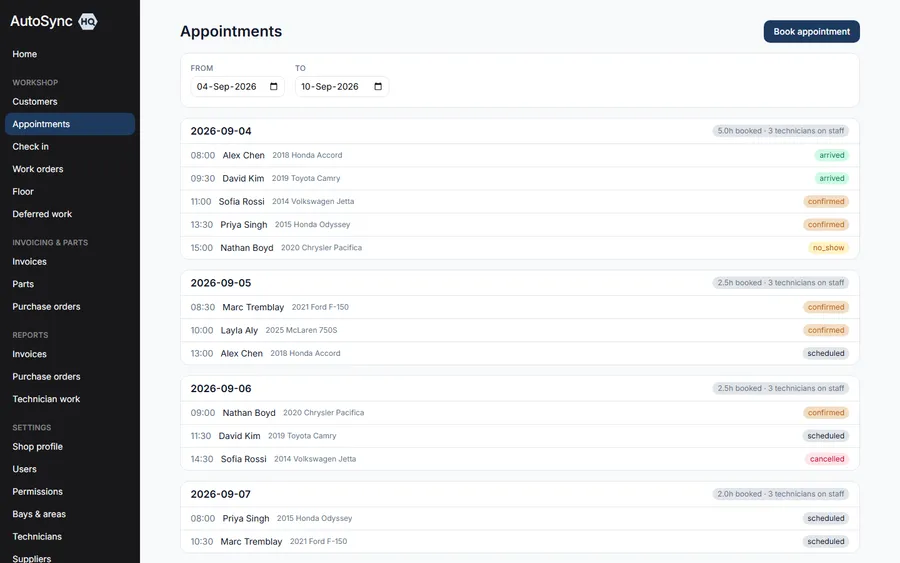
A week you can actually promise against — a real screen from AutoSyncHQ

Scheduling

A week you can actually promise against

Every booking carries its services, its technician and the hours it will take — so each day shows what is already committed before you offer a slot. Confirmations, cancellations and no-shows all sit on the same view.

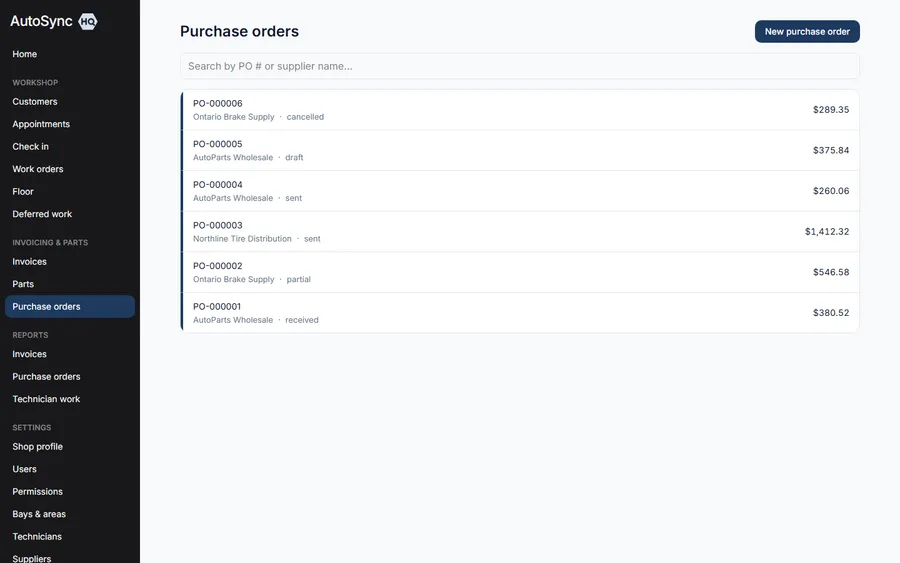
Purchase orders end to end — a real screen from AutoSyncHQ

Purchasing

Purchase orders end to end

Draft, approved against a spending limit, sent, part-received, received, cancelled — the whole lifecycle on one list, with stock booking itself in as each delivery lands.

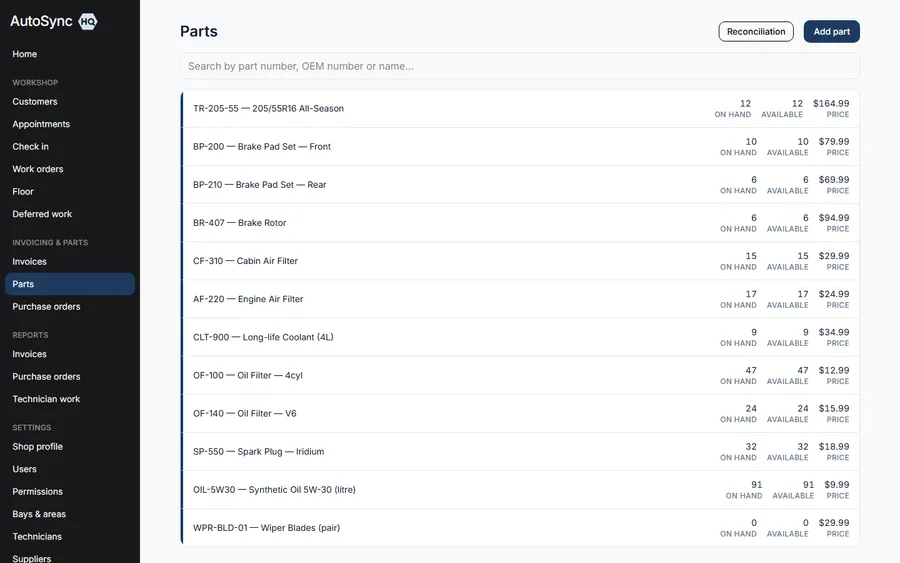
Stock that stays honest — a real screen from AutoSyncHQ

Inventory

Stock that stays honest

A part reserves when it’s quoted and leaves the shelf when the work starts — never from a count nobody trusts.

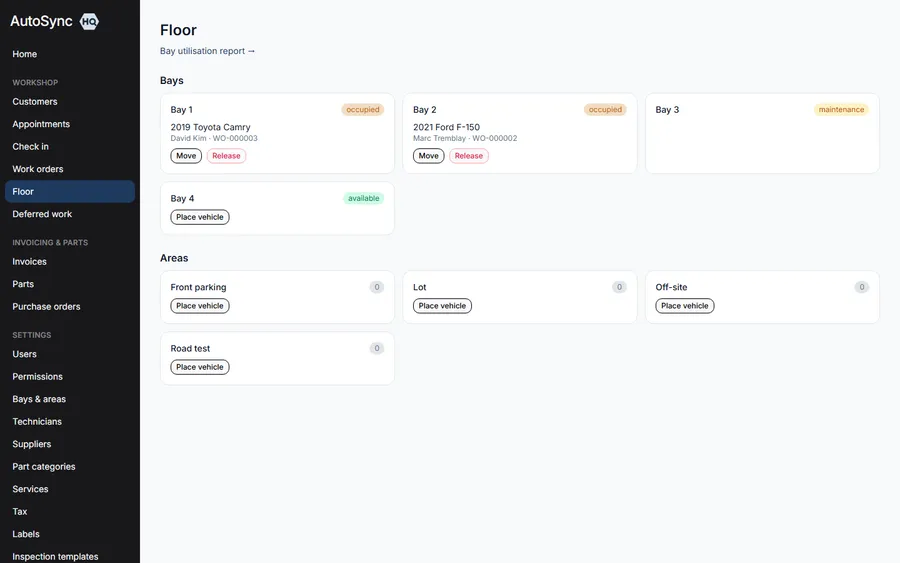
Know where every vehicle is — a real screen from AutoSyncHQ

The floor

Know where every vehicle is

A bay, the lot, a road test, off-site — every vehicle has a location, and everyone sees the same one.

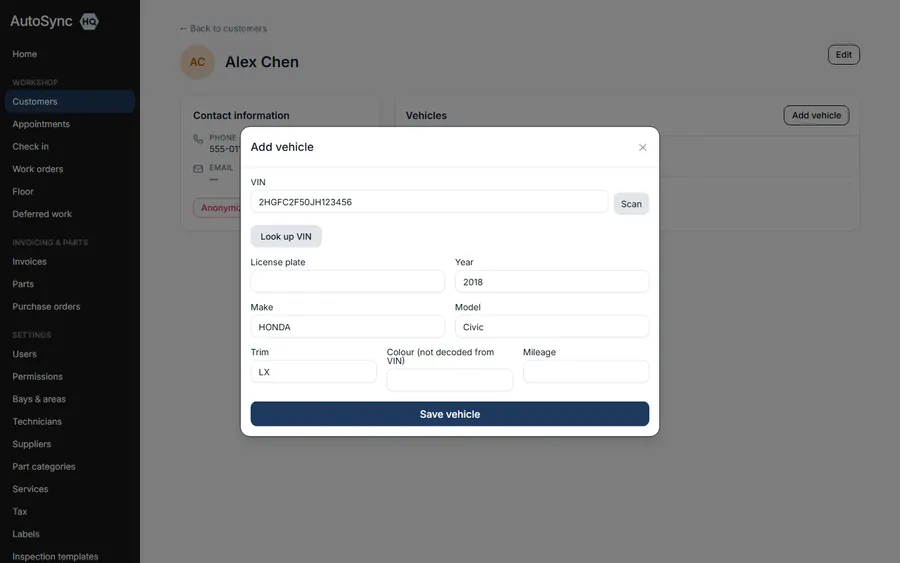
Scan the VIN, skip the typing — a real screen from AutoSyncHQ

Vehicles

Scan the VIN, skip the typing

Scan the door sticker and the year, make, model, engine and trim fill themselves in — decoded, not guessed.

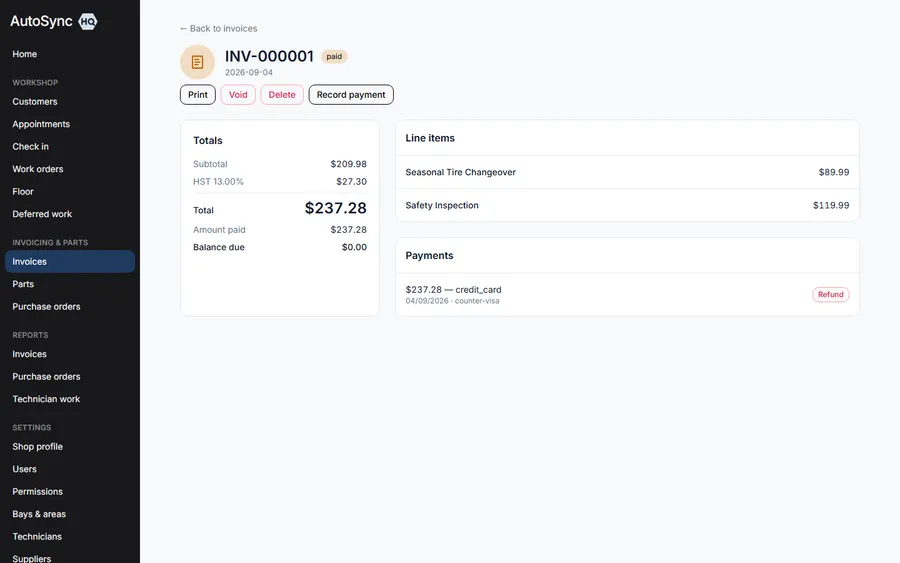
Tax, done correctly — a real screen from AutoSyncHQ

Invoicing

Tax, done correctly

GST, HST, PST, QST or a US state rate — applied for where the shop operates, shown separately on every line, and printed with your registration numbers on your letterhead.

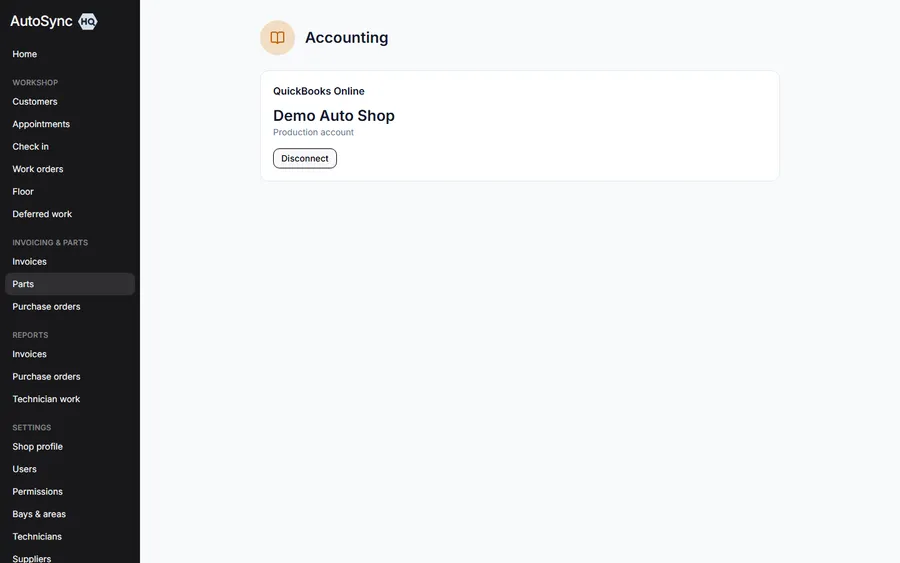
Books that update themselves — a real screen from AutoSyncHQ

Accounting

Books that update themselves

Connect QuickBooks Online once and customers, invoices, payments, vendors and purchase orders sync automatically — with a failure list you can retry, not a silent drop.

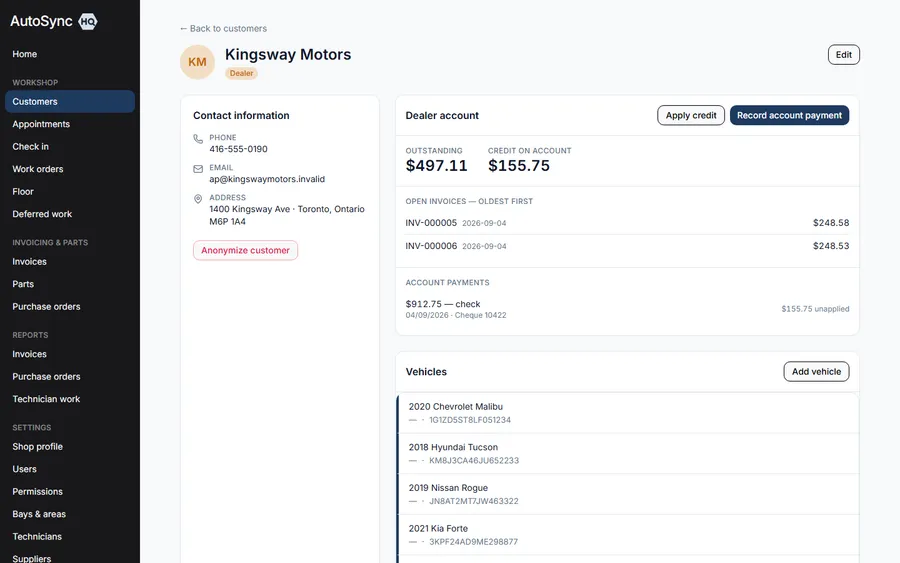
One cheque, many invoices — a real screen from AutoSyncHQ

Dealer accounts

One cheque, many invoices

A trade customer settles the account rather than an invoice: the payment fills the oldest open invoice, then the next. What it doesn’t cover is held as credit and spent against invoices raised later that month.

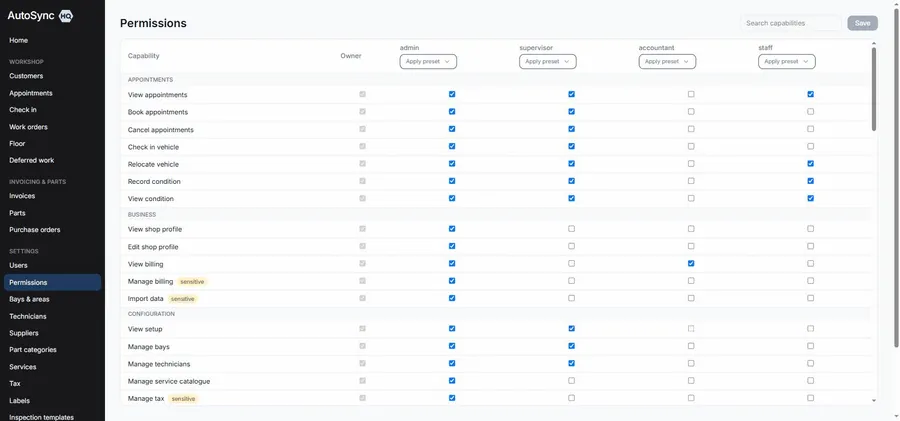
Everyone sees exactly what you decide — a real screen from AutoSyncHQ

Security

Everyone sees exactly what you decide

Over eighty permissions across eleven areas, with six role presets to start from. Part cost, margin, discounts and reports are each their own switch.

No tiers, no add-ons

Every screen above is in every plan

Including the $59.99 one. The four plans differ by how many people can sign in — nothing on this page is held back for a higher tier, and nothing is sold as a module.

Every feature, every plan

The whole list, so you don’t have to book a demo to read it.

Nothing below is an add-on, an upgrade tier or a paid module. The four plans differ by how many people can sign in — nothing else.

Front desk & customers

From the phone ringing to the car on the ramp.

  • Calendar of bookings with the services and estimated hours attached
  • Day-by-day capacity, so you see the load before you promise a date
  • Confirmations, cancellations and no-shows, each with a reason
  • Check-in that records odometer, complaint and arrival condition
  • An appointment becomes a work order without re-typing anything
  • Walk-ins raised at the counter through the same flow
  • Customer and vehicle records with full service history
  • VIN scanned from the door sticker and decoded — year, make, model, engine, trim
  • A warning when the vehicle already has an open job
  • Dealer and fleet accounts flagged apart from retail customers

Work orders & authorisation

The board the whole shop works from.

  • Estimate, in progress and completed — with status derived, never typed
  • Job lines priced from your service catalogue, or written one-off
  • Approve and decline recorded per job, with the name and the time
  • Declined and advisory work kept against the vehicle for next visit
  • Parts reserved against the job; a shortfall list of what’s blocking work
  • Progress per job, reopen, stage override, and void that returns parts to stock
  • Work order labels you define — warranty, comeback, internal, whatever you use
  • Printed on your own letterhead, logo and registration numbers included

Inspections & condition

What the technician found, in evidence.

  • Inspection templates you build — sections, points, units of measure
  • Run on a phone in the bay: pass, advise or fail, with a reading and a note
  • A finding converts to a priced job line in one tap
  • Inspection history kept against the vehicle, not just the visit
  • Condition map templates per vehicle shape, marked zone by zone
  • Arrival and handover compared on the same diagram
  • A standard inspection template seeded on day one, ready to edit

Parts, purchasing & the floor

Stock you can trust and a floor you can see.

  • Parts with categories, suppliers, bin locations and reorder levels
  • Cost and margin visible only to the people you grant it to
  • Stock adjustments that always carry a reason and write a ledger row
  • Low stock and shortfall lists that lead straight into a purchase order
  • Purchase orders raised, approved against a spending limit, then received
  • Partial receiving, with stock booked in as it lands
  • Reconciliation: stock value, movement and variance in one view
  • Bays and vehicle areas named the way your shop names them
  • Vehicle location tracked bay to lot to road test, shared by everyone
  • Bay utilisation reporting over any date range

Invoicing, payments & books

Billing only what was authorised, taxed correctly.

  • Invoice generated from the work order — authorised lines only
  • GST, HST, PST, QST and US state rates, per line, shown separately
  • Tax registration numbers printed on the documents that need them
  • Discounts with a ceiling you set, and an override for whoever you trust with it
  • Payments, part payments, refunds, voids — and delete for a mistake
  • Dealer pay-on-account: one cheque spread oldest invoice first
  • Unapplied credit held on the account and spent against later invoices
  • A statement per account customer
  • QuickBooks Online sync for customers, invoices, payments, vendors and POs
  • A sync failure list you can retry, rather than a silent drop
  • Invoice, work order and purchase order printing on your letterhead

Your shop, people & data

Set up once, controlled to the person.

  • Over eighty permissions across eleven areas, set per person
  • Six role presets — advisor, foreman, technician, parts, bookkeeper, full access
  • Prerequisites resolved for you, so a permission set can’t be half-granted
  • A home screen that shows each role what they need first
  • Users created, deactivated and password-reset by an administrator
  • One login across several shops, if you run more than one
  • Shop profile and logo, used on every printed document
  • Service catalogue, tax rates and codes, labels and templates, all yours to edit
  • CSV import of customers, vehicles and parts, previewed before it commits
  • CSV export of customers, vehicles and parts, any time
  • Customer anonymisation that strips identity and keeps the financial record
  • Reports: deferred work, invoices and revenue, purchasing, technician productivity

What it deliberately doesn’t do: there’s no customer login, no photo storage, and no hourly labour rate — a service carries a price with the labour already in it. Saying so up front is cheaper for both of us than finding out in week two.

Pricing

One product, priced by team size

Every tier gets the entire product. The only thing that changes between them is how many people can sign in.

Most shops start here

Starter

1–5 seats

$59.99 CAD/mo

An owner, an advisor and a couple of technicians

Start free trial

14 days free · no card

Small Team

6–20 seats

$149.99 CAD/mo

A counter, a parts desk and a full bay crew

Start free trial

14 days free · no card

Medium Team

21–50 seats

$299.99 CAD/mo

Multiple advisors and a large floor

Start free trial

14 days free · no card

Large Team

51–100 seats

$599.99 CAD/mo

Big operations, or several sites on one login

Start free trial

14 days free · no card

Enterprise — 100+ seats

Priced for your team specifically rather than a fixed tier. Same product, same features.

Talk to us

In every plan, including the $59.99 one

Read the full feature list →
  • Appointments & check-in
  • Work order board
  • Digital inspections
  • Condition maps
  • Inventory & purchase orders
  • Invoicing & payments
  • Dealer accounts
  • GST/HST/PST/QST & US tax
  • QuickBooks Online sync
  • Reports
  • 80+ permissions
  • CSV import & export
  • Phone, tablet and desktop

Billed monthly in Canadian dollars. Change tier or cancel yourself at any time. If the trial ends without a subscription your workspace turns read-only rather than being deleted — everything you entered stays viewable and exportable, and subscribing brings it straight back.

Questions

Questions shop owners actually ask

Something not here? Call +1 647 951 1712 — a person answers.

Do I need a credit card to start the trial?

No. The trial runs 14 days with no card taken. If you decide to subscribe, you pick a plan and add payment then — not before.

What happens to my data if I don't subscribe after the trial?

Your workspace goes read-only — nothing is deleted. Everything you entered stays viewable and exportable, and subscribing unlocks it again. A shop that hesitated for a week doesn't lose two weeks of real work.

Can I bring in my existing customers and vehicles?

Yes — bulk CSV import for customers, vehicles and parts, with a preview before anything is committed. Work order and invoice history isn’t part of that import; those start fresh.

Does it actually work on a technician's phone, or just the desk?

It works on the phone, not a cut-down version of it — the same job board, inspections, parts and vehicle moves, laid out for a touch screen in a bay instead of a mouse at a desk.

Does it handle booking as well as the work?

Yes — a calendar with the services attached to each booking, the day’s capacity in front of you before you promise a date, confirmations, cancellations and no-shows, and a check-in that turns the arrival into a work order.

Are inventory and purchase orders extra?

No. Parts, stock movements, suppliers, reorder levels, purchase orders with approval limits, partial receiving and stock reconciliation are all in every plan, including the $59.99 one.

We invoice dealers and body shops monthly. Does that work?

Yes. A customer marked as a dealer can settle on account: one payment is spread across their open invoices, oldest first, and whatever it doesn’t cover is held as credit against invoices that haven’t been raised yet. Each account has its own statement.

Can I stop staff seeing cost, margin or other people’s jobs?

Yes — over eighty separate permissions, set per person, with six role presets to start from. Part cost, margin, discounts, valuation, technician reporting and "all work orders" versus "only mine" are each their own switch.

What tax does it handle?

GST, HST, PST and QST for Canadian provinces, and state rates for the US — applied correctly for where the shop operates, shown separately on every invoice, with your registration numbers on the printed document.

Does it connect to QuickBooks Online?

Yes — connect once and customers, invoices, payments, vendors and purchase orders sync automatically, in every plan. No add-on, no upgrade tier. Anything that fails to sync lands in a list you can retry rather than disappearing quietly.

Can inspections include photos?

No, and that’s deliberate — inspections record measurements and notes, and body damage goes on a zone diagram rather than a photo roll. The only image the system stores is your shop logo.

I run more than one shop. Can I use one login?

Yes — one email can belong to several workspaces, and you pick which shop you’re working in when you sign in. Each shop keeps its own data, staff and permissions.

What if my team grows past 100 people?

That's Enterprise — priced for your team specifically rather than a fixed tier. Contact us and we'll set it up.

Can I change plans later?

Yes, at any time — the four tiers differ only by how many seats they include, not by feature. Move up or down as your team changes.
Run a real day through it before you decide.

Import your customers and vehicles, book a car in, run the inspection, invoice it — and judge it on your own numbers rather than a sales call.

14 days free. No card required. Cancel yourself, any time.