Features
Everything the shop runs on, one page per thing
Each page below is one part of the product end to end: who does what, what’s in it, and what it deliberately doesn’t do. Every screen is a real one from the demo shop, and everything here is in every plan.
Front desk
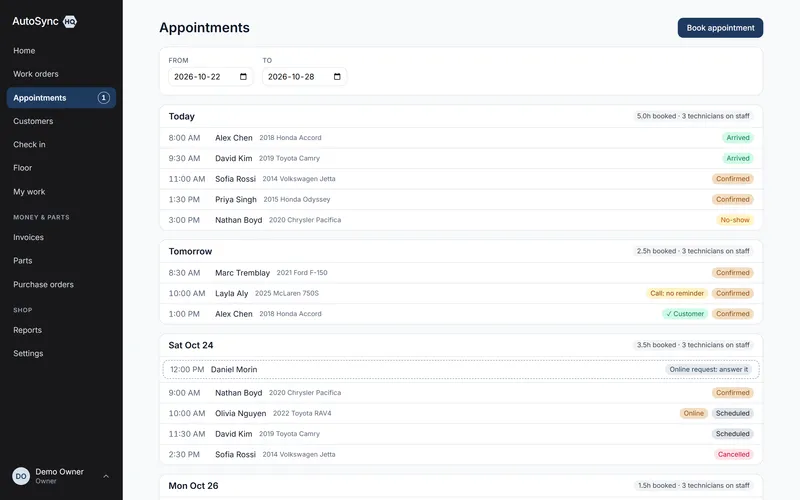
Online booking & reminders
Customers request a time your shop actually has free, from a page you link from your website, Google listing or Facebook.
Read how it runs →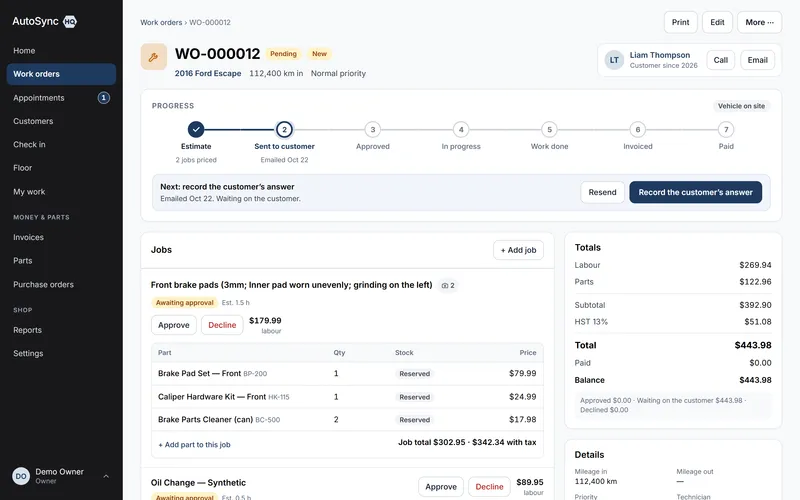
Authorisation
Customer approval by link
Email the estimate from the work order and the customer opens a link: every pending job with its price, tax and the technician’s photos.
Read how it runs →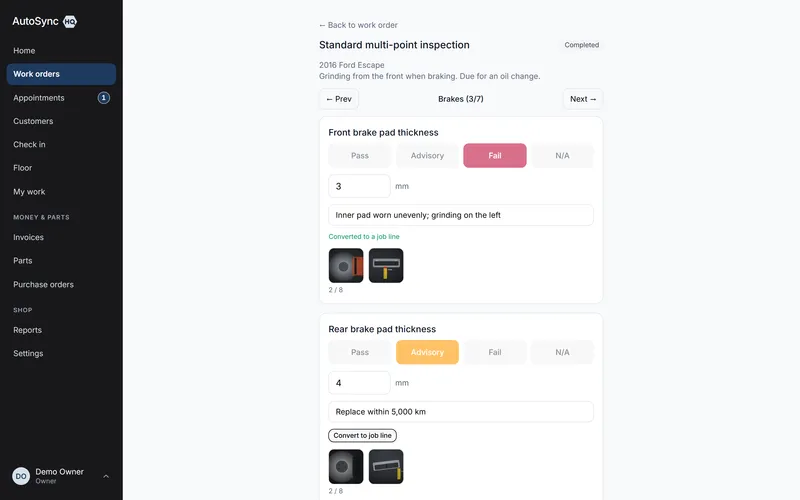
In the bay
Inspections, photos & condition maps
Inspections run on a phone in the bay: pass, advisory, fail or N/A, with the measurement, a note and photos.
Read how it runs →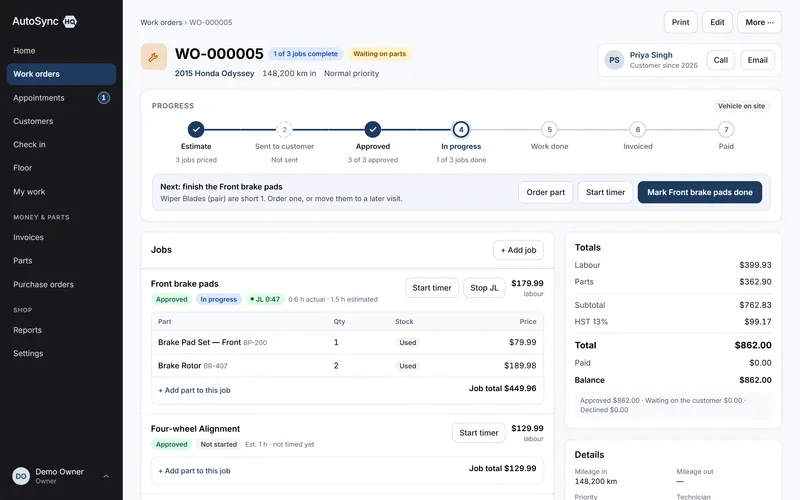
The board
Work orders, canned jobs & the labour timer
Status is derived from the facts — jobs approved, work done, invoice paid — so nobody re-types it onto a whiteboard.
Read how it runs →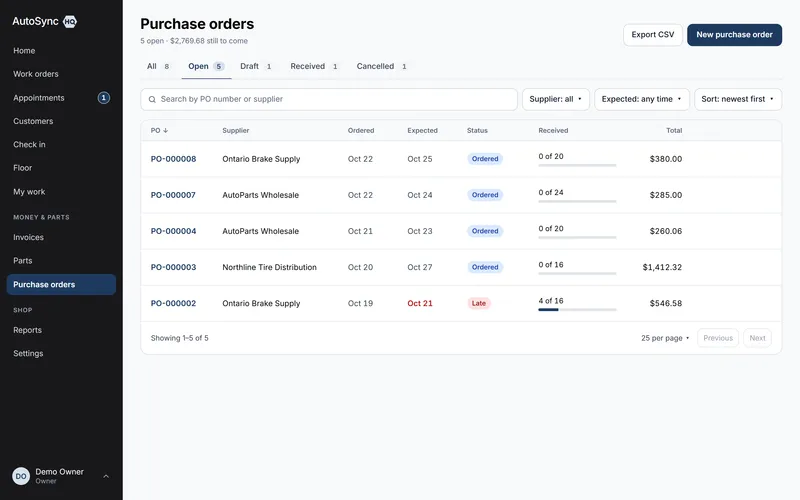
Parts desk
Parts, stock & purchase orders
A part reserves when it’s quoted, leaves the shelf when work starts, and comes back when a job is declined or voided — every movement a ledger row with a reason.
Read how it runs →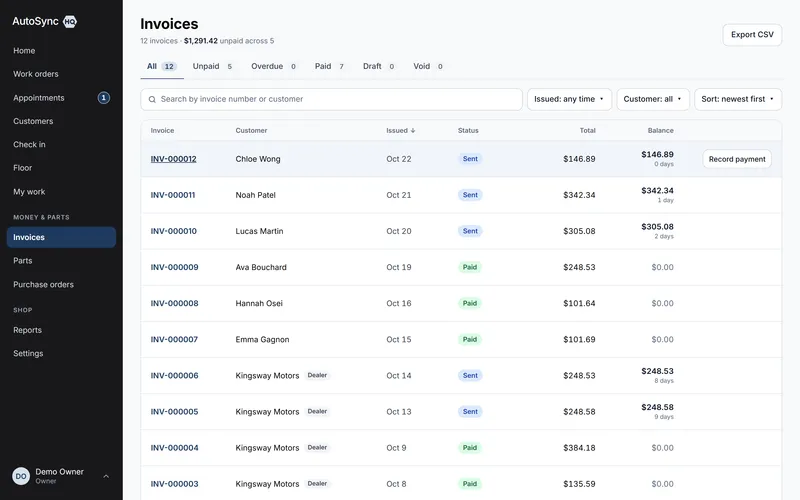
The money
Invoicing, Canadian tax & QuickBooks
The invoice carries approved lines only, with GST, HST, PST, QST or a US state rate shown per line and your registration numbers on your letterhead.
Read how it runs →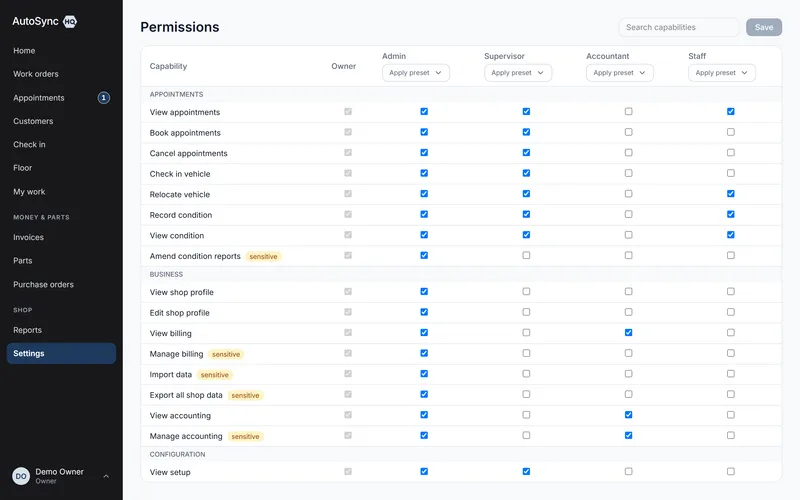
Control
Permissions, exports & your data
Over eighty permissions across eleven areas, with six role presets to start from.
Read how it runs →Every feature, every plan
The whole list, so you don’t have to book a demo to read it.
Nothing below is an add-on, an upgrade tier or a paid module. The four plans differ by how many people can sign in — nothing else.
Front desk & customers
From the phone ringing to the car on the ramp.
- Calendar of bookings with the services and estimated hours attached
- A booking page of your own, where customers request a time you actually have free
- Accept a request in one step, or decline it; nothing is booked until you do
- Day-by-day capacity, so you see the load before you promise a date
- Confirmations, cancellations and no-shows, each with a reason
- A reminder email a day or two ahead, which the customer confirms with one tap
- The calendar marks who confirmed, and whose reminder didn’t reach them
- Check-in that records odometer, complaint and arrival condition
- An appointment becomes a work order without re-typing anything
- Walk-ins raised at the counter through the same flow
- Customer and vehicle records with full service history
- VIN scanned from the door sticker and decoded — year, make, model, engine, trim
- A warning when the vehicle already has an open job
- Dealer and fleet accounts flagged apart from retail customers
Work orders & authorisation
The board the whole shop works from.
- A seven-step bar on every work order — estimate to paid — with status derived, never typed, and the next step shown
- Job lines priced from your service catalogue, or written one-off
- Canned jobs: a service bundles its parts, charged on top or included in one menu price
- A labour timer per job — Start, Switch, Stop on a phone — with actual hours shown against estimated
- Approve and decline recorded per job, with the name and the time
- An approval link in the estimate email; the customer answers each job on their phone
- Links expire, are revoked when the estimate changes, and show when they were opened
- A PDF of every customer answer kept with the work order, and a copy sent to them
- Declined and advisory work kept against the vehicle for next visit
- Parts reserved against the job; a shortfall list of what’s blocking work
- Progress per job, reopen, stage override, and a void that returns parts to stock and records who and why
- Work order labels you define — warranty, comeback, internal, whatever you use
- Printed on your own letterhead, logo and registration numbers included
Inspections & condition
What the technician found, in evidence.
- Inspection templates you build — sections, points, units of measure
- Run on a phone in the bay: pass, advisory, fail or N/A, with a reading, a note and up to eight photos a point
- A finding converts to a priced job line in one tap, its photos travelling to the customer’s approval page
- Photos stored privately in Canada, location data stripped; condition photos protected as dispute evidence
- Inspection history kept against the vehicle, not just the visit
- Condition map templates per vehicle shape, marked zone by zone
- Arrival and handover compared on the same diagram, arrival photos alongside
- A standard inspection template seeded on day one, ready to edit
Parts, purchasing & the floor
Stock you can trust and a floor you can see.
- Parts with categories, suppliers, bin locations and reorder levels
- Cost and margin visible only to the people you grant it to, and marked in every list and export
- Stock adjustments that always carry a reason and write a ledger row
- Low stock and shortfall lists that lead straight into a purchase order
- Purchase orders raised, approved against a spending limit, then received
- Partial receiving, with stock booked in as it lands
- Reconciliation: stock value, movement and variance in one view
- Suppliers synced to QuickBooks as vendors; a cancelled PO closed there too
- Bays and vehicle areas named the way your shop names them
- Vehicle location tracked bay to lot to road test, shared by everyone
- Bay utilisation reporting over any date range
Invoicing, payments & books
Billing only what was authorised, taxed correctly.
- Invoice generated from the work order — authorised lines only
- GST, HST, PST, QST and US state rates, per line, shown separately
- Tax registration numbers printed on the documents that need them
- Discounts with a ceiling you set, and an override for whoever you trust with it
- Payments, part payments, refunds as their own record, voids with who, when and why; only drafts can be deleted
- Dealer pay-on-account: one cheque spread oldest invoice first
- Unapplied credit held on the account and spent against later invoices
- A statement per account customer
- QuickBooks Online sync for customers, invoices, payments, voids, vendors and POs
- A sync failure list you can retry, rather than a silent drop
- Invoice, work order and purchase order printing on your letterhead
- Estimates and invoices emailed to the customer as a PDF, with delivery shown
Your shop, people & data
Set up once, controlled to the person.
- Over eighty permissions across eleven areas, set per person
- Six role presets — advisor, foreman, technician, parts, bookkeeper, full access
- Prerequisites resolved for you, so a permission set can’t be half-granted
- A home screen that shows each role what they need first
- Users created, deactivated and password-reset by an administrator
- One login across several shops, if you run more than one
- Shop profile and logo, used on every printed document
- Service catalogue, tax rates and codes, labels and templates, all yours to edit
- CSV import of customers, vehicles and parts, previewed before it commits
- A full export of everything, any time: every record as spreadsheet files, with a guide to every column
- Export CSV on every list and report — exactly what’s on the screen, filtered and sorted
- One customer’s data exported in a click, when they ask what you hold about them
- Customer anonymisation that strips identity and keeps the financial record
- Reports: deferred work, invoices and revenue, purchasing, technician work with clocked, booked and efficiency
What it deliberately doesn’t do: there’s no customer login (the link, the booking page and emailed PDFs cover it without an account), no hourly labour rate (a service carries a price with the labour already in it — the timer measures, it never bills), no card processing, and nothing promotional is ever sent to your customers. So if your shop bills labour by the hour, wants cards taken inside its shop software, or sends marketing to customers, AutoSyncHQ isn’t the right fit. Saying so up front is cheaper for both of us than finding out in week two.
Run a real day through it before you decide.
Import your customers and vehicles, book a car in, run the inspection, invoice it — and judge it on your own numbers rather than a sales call.
14 days free. No card required. Cancel yourself, any time.