Front desk
A booking page of your own, and a reminder that confirms itself
Customers request a time your shop actually has free, from a page you link from your website, Google listing or Facebook. Nothing is booked until you accept it. The day before, they get a reminder in your name and confirm with one tap.
14 days free. No card required.
How it runs
Who does what, in order
- 1 Customer
Requests a time on your booking page
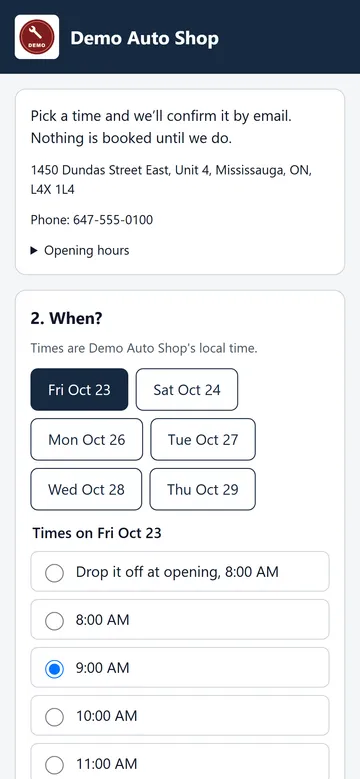
They pick the services you chose to offer (or “something else”), a slot or a drop-off, and leave their name, mobile, email and vehicle. The page only offers times inside your hours that the per-slot and per-day limits allow, so it never overbooks. No prices, nothing paid online, no account.
- 2 Advisor
Accepts it in one step
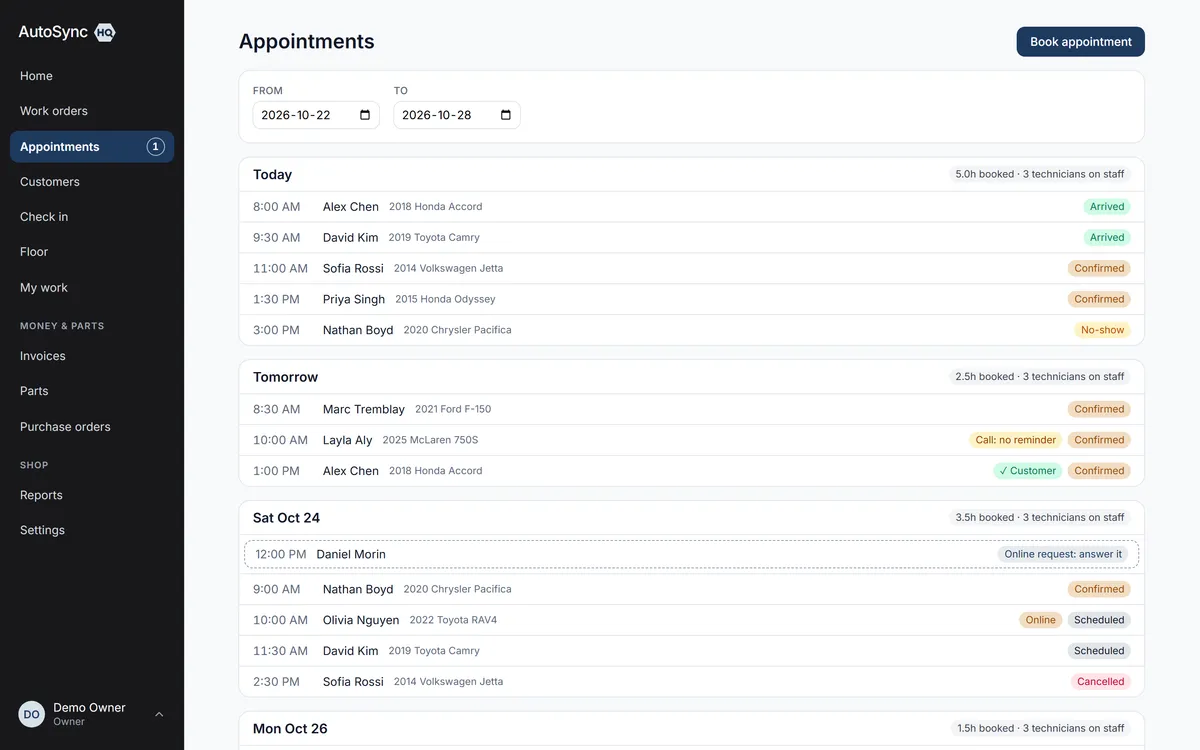
The request appears on Home and on the calendar as a dashed placeholder; the shop gets a short email. The advisor links an existing customer or creates one, then accepts — it becomes an ordinary appointment and the customer gets a booking email. Or decline with a note, or discard as spam.
- 3 Automatic
Reminds the customer the day before
At 10:00 your local time, one or two days ahead, the customer gets an email in your shop’s name with the time, vehicle, services, your address and phone, and a Confirm button. Opening it confirms nothing; the tap does.
- 4 Advisor
Sees who confirmed, and who needs a call
The calendar marks customer confirmations. If a reminder couldn’t go — no email on file, bounced, unsubscribed, booked after the reminder time — the appointment says why, so the advisor phones instead of assuming.
In detail
What’s in it
- Your own URL: autosynchq.ca/book/your-shop, plus a QR code and a copy-paste “Book online” button for your website
- Weekly opening hours and closed dates, set once, used by the booking page and by capacity
- Limits you set: slot length, requests per slot and per day, minimum notice, how far ahead
- Requests, not instant bookings: a person looks before anything is booked or emailed
- Requests waiting more than four business hours are flagged on Home
- Reminders off for existing shops until you turn them on; on by default for new shops
- Reminders carry no prices and no promotions — transactional only, with your address and an unsubscribe link
- Text-message reminders for consenting customers switch on automatically once carrier verification completes
- Online bookings are marked on the calendar, and feed the same capacity view as phone bookings
Said up front
There is no online cancel or reschedule yet — the reminder says “call us or reply to this email”. Nothing is ever sent to a requester until someone at your shop has looked at the request.
Every plan
Everything on this page is in every plan, including the $59.99 one. The four plans differ by how many people can sign in — nothing else.
See the plans →Questions
Asked about this
Can customers book online?
They can request an appointment, if you turn it on. Your shop gets its own booking page: the customer picks the services you offer and a time your shop actually has free, or a drop-off, and leaves their details. Nothing is booked until someone at your shop accepts the request; then the customer gets a booking email.
Does it remind customers of their appointment?
Yes, if you turn it on. A day or two before, the customer gets an email in your shop’s name with the time, the vehicle, your address and phone, and a button to confirm. The booking then shows as confirmed by the customer. If one can’t go, the booking tells you to call instead.
What stops spam on the booking page?
Nothing is emailed or stored as a customer until you accept, so a junk request costs you one tap to discard. Rate limits, a daily ceiling per shop and a hidden honeypot field catch the automated kind. There is no CAPTCHA and no third-party script on the page.
Run a real day through it before you decide.
Import your customers and vehicles, book a car in, run the inspection, invoice it — and judge it on your own numbers rather than a sales call.
14 days free. No card required. Cancel yourself, any time.