The board
A board that updates itself, jobs that bring their parts, and the hours a job really took
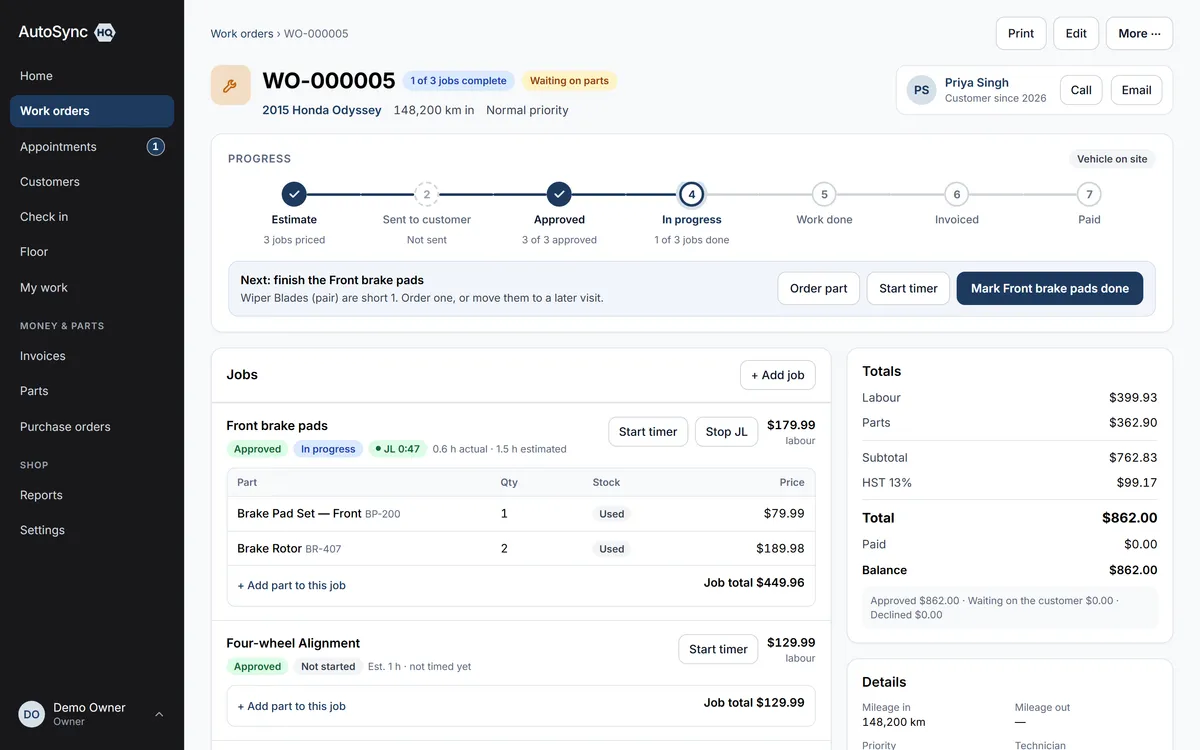
Status is derived from the facts — jobs approved, work done, invoice paid — so nobody re-types it onto a whiteboard. A catalogue service can carry its parts, charged on top or included in the price. A technician taps Start and Stop on each job, and you see actual hours against the estimate.
14 days free. No card required.
How it runs
Who does what, in order
- 1 Advisor
Builds the estimate from the catalogue
Add job picks a service and lists the parts it brings, each ticked with an editable quantity and its stock position (“2 on hand, 4 needed: will be short”). Prices are snapshotted onto the line, so a later catalogue change never rewrites an estimate.
- 2 Technician
Starts the job — and the timer
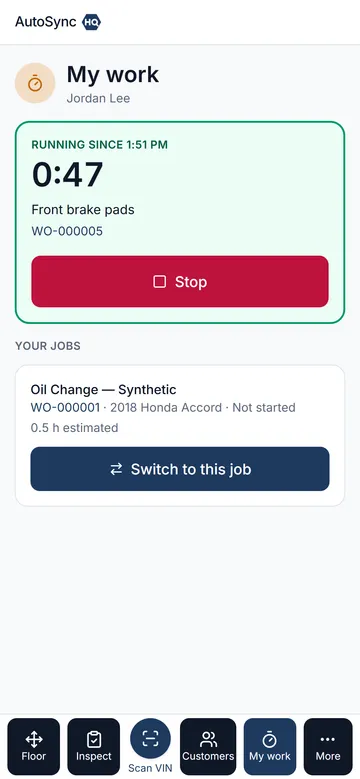
Tap Start on My work: the job moves to in progress, reserved parts leave stock, and the timer runs. Switch to the next job with one tap; the first stops at that instant. One running timer per technician, and helpers can time the same job.
- 3 Automatic
Moves the work order along
A seven-step bar on every work order — Estimate, Sent to customer, Approved, In progress, Work done, Invoiced, Paid — with one clear next step under it. Completing the last authorised job moves the order to Work done on its own; a forgotten timer is stopped an hour after closing and flagged for review.
- 4 Owner or foreman
Reads actual against estimated
Each job line shows “1.4 h actual · 1.0 h estimated”. The Technician Work Report adds clocked hours, booked hours and efficiency per technician for the period — management information that never touches a price and never reaches a customer.
In detail
What’s in it
- Three stages on the board (estimate, in progress, completed) and a status derived, never typed
- Canned jobs: a service bundles inventory parts, charged at each part’s price on top or included in the service price (“Oil change, $79.99 all in”)
- Bundled parts arrive by every path: adding a job by hand, converting an inspection finding, checking in a booked service
- Parts reserve when quoted and leave stock when work starts; a shortfall list shows what’s blocking work
- Approve and decline per job with who and when; declined work stays on the vehicle for next visit
- Labour entries can be edited or voided with a required reason, and every change keeps its history
- Work order labels you define — warranty, comeback, internal; vehicle location tracked bay to lot to road test
- Void returns parts to stock and records who, when and why
Said up front
There is no hourly labour rate: a service carries a price with the labour already in it. The timer measures; it never bills. There is no payroll or attendance clock.
Every plan
Everything on this page is in every plan, including the $59.99 one. The four plans differ by how many people can sign in — nothing else.
See the plans →Questions
Asked about this
Does the timer change what the customer pays?
No. Prices come from your catalogue and are snapshotted onto the job line. Actual hours are for you — which jobs are under-quoted, who is efficient, where the day went — and they appear on none of the documents a customer sees.
What is a canned job?
A catalogue service that brings its own parts. Build “Front brake pads” once with the pads, hardware kit and brake cleaner; every time an advisor adds that job, the parts come with it, priced and reserved like any part added by hand. Choose per service whether parts are charged on top or included in the price.
Can two technicians work the same job?
Yes. Each technician has one running timer, and several can run on the same job. Each entry records its own technician, so the report credits the right people.
Run a real day through it before you decide.
Import your customers and vehicles, book a car in, run the inspection, invoice it — and judge it on your own numbers rather than a sales call.
14 days free. No card required. Cancel yourself, any time.