The money
Bill only what was authorised, tax it correctly, and let the books update themselves
The invoice carries approved lines only, with GST, HST, PST, QST or a US state rate shown per line and your registration numbers on your letterhead. Email it as a PDF, take payment at the counter or on account, and QuickBooks Online is updated without a CSV.
14 days free. No card required.
How it runs
Who does what, in order
- 1 Advisor
Generates the invoice from the work order
Authorised job lines, their parts, and any shop supplies — never a declined or pending line, and that can’t be overridden. A discount is applied before tax and spread across every line in proportion, so the tax owed never depends on which line someone picked.
- 2 Advisor
Prints or emails one document
The same PDF prints and emails: legal name, address, GST/HST/QST numbers, each tax on its own line. Emailing a draft marks it sent and syncs it to QuickBooks once; re-sending a paid invoice sends a copy and changes nothing.
- 3 Advisor or bookkeeper
Records the payment
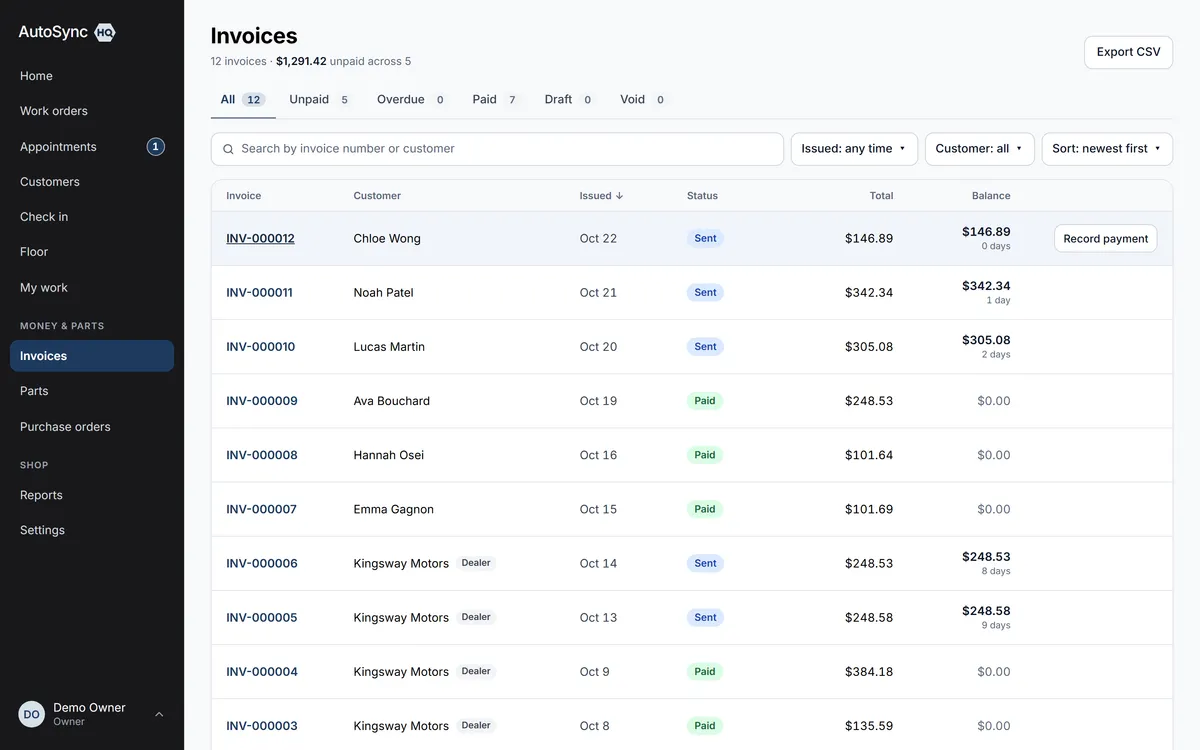
Record payment from the invoices list or the work order’s next step: amount, method, reference. Part payments leave the balance showing; the list header totals what’s unpaid across the shop. A dealer’s cheque goes on the account and is spread oldest invoice first.
- 4 Bookkeeper, weekly
Checks the failure list, not a spreadsheet
Customers, invoices, payments, voids, vendors and purchase orders sync as they happen. Anything QuickBooks rejected lands in a list you can fix and retry. Nothing is dropped silently.
In detail
What’s in it
- GST, HST, PST, QST and US state rates, resolved per line from the service or part’s tax code
- Tax registration numbers and your logo on every printed and emailed document
- Payments, part payments, refunds as their own record (never a negative payment), voids with who, when and why
- Only drafts can be deleted; a sent invoice is voided, and the void reaches QuickBooks
- Dealer accounts: one payment spread oldest invoice first, unapplied credit held and applied to later invoices, a statement per account
- Invoices list with Unpaid, Overdue, Paid and Draft tabs, a filter for dealer customers, and Export CSV of exactly what’s shown
- An invoice report by period, with refunded and void invoices treated correctly
Said up front
Payment methods are labels — cash, card, e-transfer, cheque, financing — nothing is processed in the app, and there is no card terminal integration. Refunds are recorded here but not sent to QuickBooks.
Every plan
Everything on this page is in every plan, including the $59.99 one. The four plans differ by how many people can sign in — nothing else.
See the plans →Questions
Asked about this
What tax does it handle?
GST, HST, PST and QST for Canadian provinces, and state rates for the US — applied correctly for where the shop operates, shown separately on every invoice, with your registration numbers on the printed document.
Does it connect to QuickBooks Online?
Yes — connect once and customers, invoices, payments, voids, vendors and purchase orders sync automatically, in every plan. No add-on, no upgrade tier. Anything that fails to sync lands in a list you can retry rather than disappearing quietly.
We invoice dealers and body shops monthly. Does that work?
Yes. A customer marked as a dealer settles on account: one payment is spread across their open invoices, oldest first, and whatever it doesn’t cover is held as credit against invoices that haven’t been raised yet. Each account has its own statement.
Run a real day through it before you decide.
Import your customers and vehicles, book a car in, run the inspection, invoice it — and judge it on your own numbers rather than a sales call.
14 days free. No card required. Cancel yourself, any time.