Authorisation
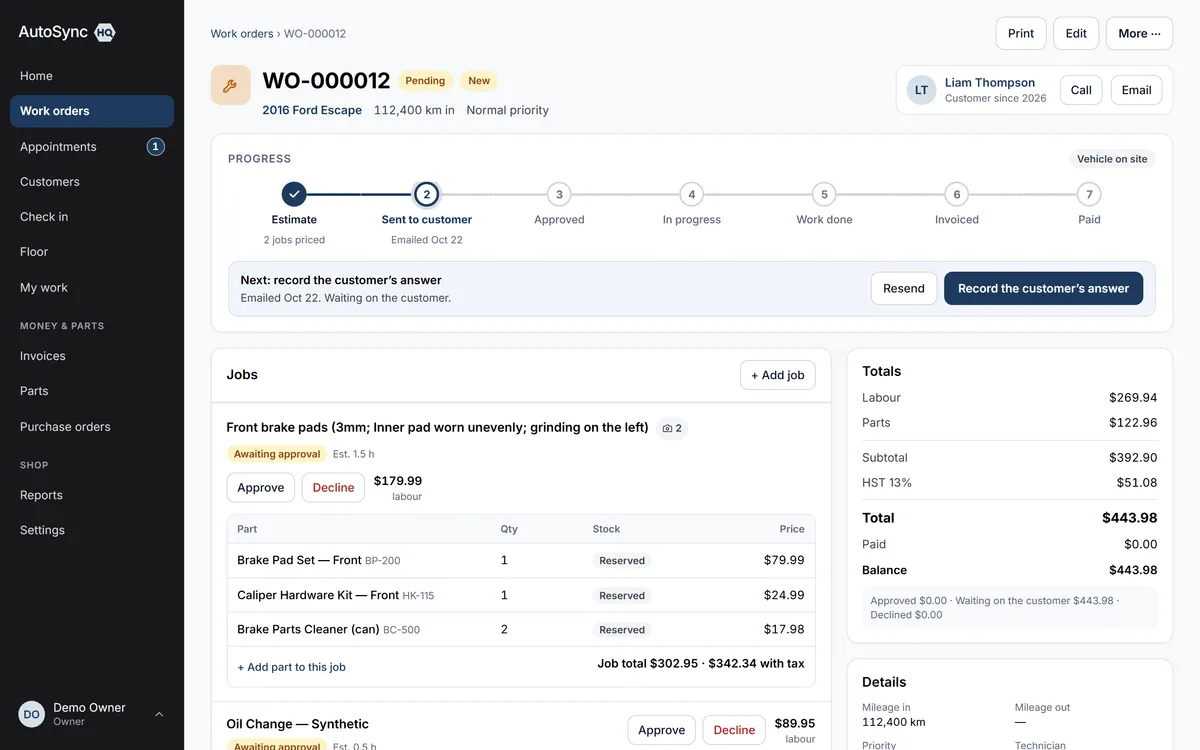
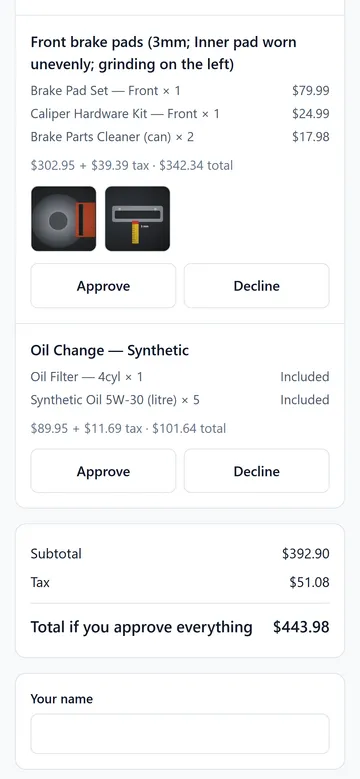
The estimate goes to their phone. They approve each job and type their name.
Email the estimate from the work order and the customer opens a link: every pending job with its price, tax and the technician’s photos. They approve some, decline others, type their name and submit. Your board updates as they do, and both of you get a PDF of exactly what was agreed.
14 days free. No card required.
How it runs
Who does what, in order
- 1 Advisor
Emails the estimate
From the work order, Email to customer shows the recipient on file, a preview of the exact PDF, and an “include approval link” toggle that is on whenever jobs are pending. The email goes in your shop’s name and replies come to your inbox.
- 2 Customer
Answers each job on their phone
The page at autosynchq.ca/e/… lists each pending job with its price (parts included, never itemised), the tax, and the finding photos. Approve or decline per line, type a name, submit. One answer per link; a second visit shows what was recorded.
- 3 Automatic
Updates the work order and tells the shop
Approved jobs are authorised and the work order moves to In progress; declined ones go to deferred work. The shop gets an email (“approved 2 of 3 jobs — $X”), the customer gets a confirmation with a PDF, and that PDF is kept on the work order.
- 4 Advisor
Knows when to pick up the phone
The work order shows the link as sent, delivered, viewed, answered, expired or revoked. A link viewed but unanswered for four business hours is flagged on Home.
In detail
What’s in it
- Links expire after seven days, and the moment a pending line’s price or description changes
- The approval page, the estimate PDF and the invoice agree to the cent — tested on every build
- A customer’s approval records the typed name, time, IP address and the exact lines they saw
- “Approved online by {name}, {date}” prints on the work order and the invoice
- Approvals at the counter work exactly as before — the link is an extra path, not the only one
- No email on file, unsubscribed or bounced? Sending is refused with the reason; take the approval by phone
- Delivery tracking on every estimate and invoice email: sent, delivered, bounced
- Every customer email carries a one-click unsubscribe, as Canadian anti-spam law requires
Said up front
The typed name is a strong record, not a legal e-signature, and the product never calls it one. Text-message delivery of the link waits on carrier verification; email is live today.
Every plan
Everything on this page is in every plan, including the $59.99 one. The four plans differ by how many people can sign in — nothing else.
See the plans →Questions
Asked about this
Can the customer approve the estimate themselves?
Yes. The estimate email carries a link, and they approve or decline each job on their phone and type their name — no account, no app, no login. The work order updates as soon as they submit, they get a PDF of what they agreed to, and the link expires after seven days or the moment you change the estimate.
Can I email estimates and invoices to customers?
Yes. From the work order or the invoice, send the customer the same PDF you would print, in your shop’s name, with replies coming to your shop’s email. You can see whether it was delivered or bounced, and customers can stop the emails with one click.
What does the customer see about parts and labour?
Each job shows one price with its parts included; the parts themselves are never listed, and neither are costs, margins or your technician’s actual hours. A bundled part you’ve marked as included in the service price reads “Included”, not $0.00.
Run a real day through it before you decide.
Import your customers and vehicles, book a car in, run the inspection, invoice it — and judge it on your own numbers rather than a sales call.
14 days free. No card required. Cancel yourself, any time.