In the bay
What the technician found, in evidence
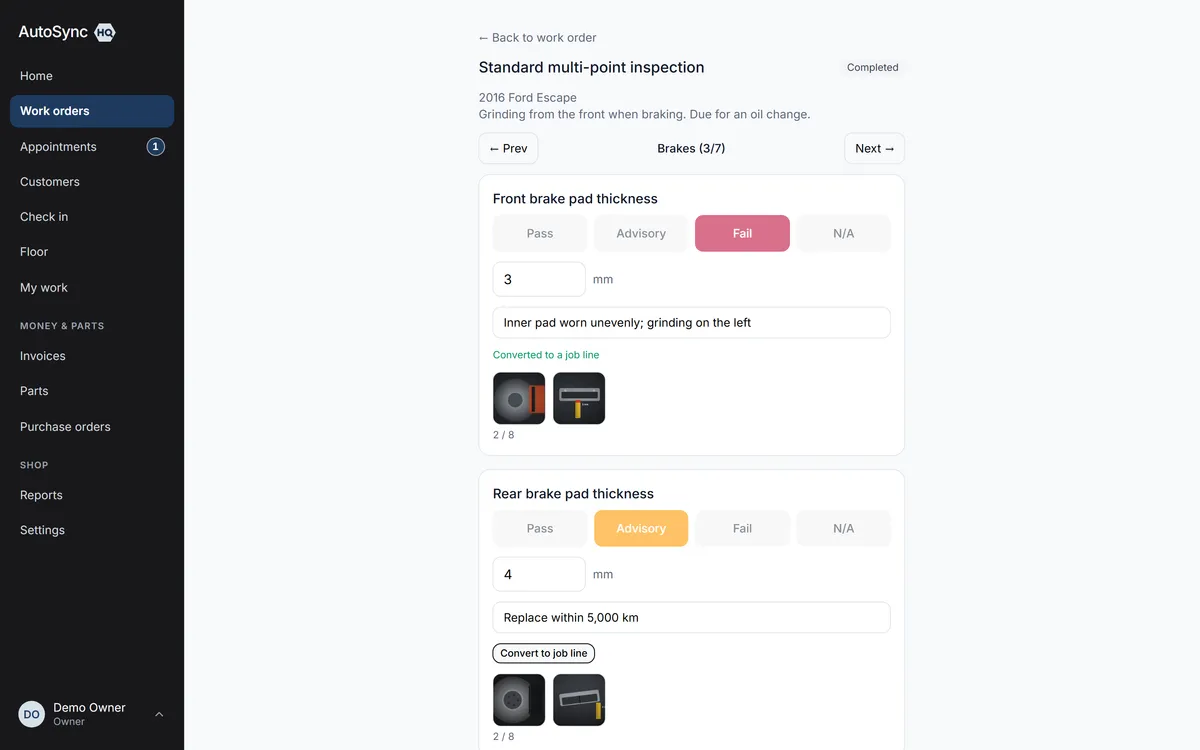
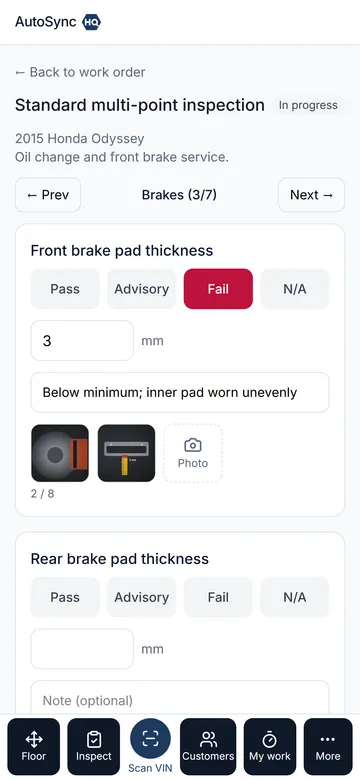
Inspections run on a phone in the bay: pass, advisory, fail or N/A, with the measurement, a note and photos. A failed point becomes a priced job in one tap. A condition map at arrival and again at handover, photos alongside, settles “you scratched my door” before it starts.
14 days free. No card required.
How it runs
Who does what, in order
- 1 Technician
Runs the inspection on a phone
One section at a time, large targets, numeric entry that doesn’t demand precision. Each point is pass, advisory, fail or N/A — with “not checked” as the honest default — plus a reading, a note and up to eight photos straight from the camera. Entries save as you go, so a dead spot in the shop loses nothing.
- 2 Advisor
Converts findings to priced jobs
Every fail or advisory point linked to a catalogue service shows Convert to job line. One tap prices it from the catalogue, carries the measurement, note and photos across, and adds the service’s bundled parts. The photos then travel with the estimate to the customer’s approval page.
- 3 Advisor or technician
Maps the condition at the door
Tap a zone on the vehicle diagram, set the damage type and severity, photograph it. At handover the arrival report is overlaid in grey, so any new mark stands out immediately — and the arrival photos sit beside it.
- 4 Automatic
Keeps the evidence
Inspections are kept against the vehicle, not just the visit, so next year’s can be compared to this one. Declined advisories go to the deferred work report with the measurement’s age (“4 mm, measured 11 months ago”).
In detail
What’s in it
- Inspection templates you build: sections, points, units of measure; a standard template seeded on day one
- Up to eight photos per inspection point and per damage mark, 24 walk-around shots per condition report
- Photos stored privately in Toronto, served through short-lived links, with the camera’s location data stripped on upload
- Condition-report photos can’t be freely deleted after the day of capture — they are dispute evidence
- Several inspections per work order: an arrival walk-round, a re-check after work, a pre-purchase inspection sold as a service
- A technician limited to their own work orders keeps their inspection and never sees prices or customer contact details
- Inspection history and condition reports on the vehicle record and on the work order print
Every plan
Everything on this page is in every plan, including the $59.99 one. The four plans differ by how many people can sign in — nothing else.
See the plans →Questions
Asked about this
Can inspections include photos?
Yes. A technician can photograph any inspection point or damage mark straight from their phone, up to eight each, and at handover the arrival photos sit beside the new condition report. Photos are stored privately in Canada, and the camera’s location data is removed before they’re saved.
Do I need a separate inspection app on the technicians’ phones?
No. It is the same web application as the counter, laid out for a touch screen in a bay. Nothing to install from an app store, and nothing missing on the phone that the desk has.
Why doesn’t “Convert to job line” appear on a finding?
The inspection point isn’t linked to a catalogue service yet. Set the service on each point in Settings → Inspection templates once, and from then on every fail or advisory on that point converts in one tap.
Run a real day through it before you decide.
Import your customers and vehicles, book a car in, run the inspection, invoice it — and judge it on your own numbers rather than a sales call.
14 days free. No card required. Cancel yourself, any time.